Why Your Ads Cost More Than Your Competitors
You set your Google Ads bid. Your competitor sets theirs. But somehow, they’re showing up above you — and paying less per click. Sound familiar? This frustrating scenario plays out every day for businesses in Boise and across the country, and nine times out of ten, the culprit is the same: Google Ads Quality Score.
Quality Score is one of the most misunderstood — and most impactful — factors in your entire Google Ads account. Get it right, and Google actually rewards you with cheaper clicks and prime ad positions. Get it wrong, and you’re essentially penalized: paying a premium to show up lower than your competitors. This guide breaks it all down — what Quality Score is, how it’s calculated, why it matters, and exactly what to do to improve it.
What Is Google Ads Quality Score?
experience is compared to what a searcher is actually looking for.
A score of 10/10 means Google loves your ad. Your keyword, ad copy, and landing page all match what the searcher wants. A score of 1/10? Google sees a major disconnect — and makes you pay for it.
Quality Score is calculated at the keyword level, not the campaign or account level. That means you could have one keyword with a 9 and another with a 3 in the same ad group, and each one will behave very differently at auction.
Quick Stat: Improving your Quality Score from a 5 to a 7 can reduce your cost-per-click by up to 28%, according to WordStream research. A drop from 5 to 3 increases your CPC by as much as 67%.
The 3 Components of Quality Score (And How Google Weighs Them)
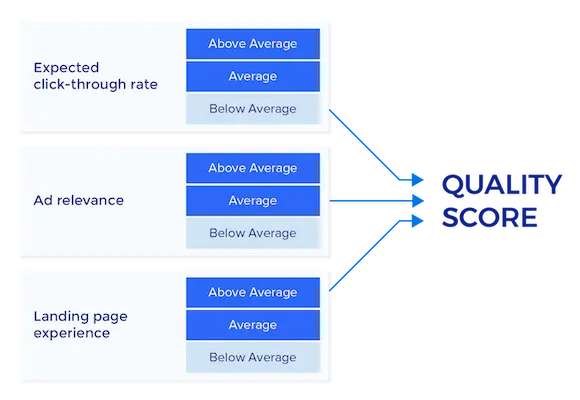
Google evaluates three core components when assigning your Quality Score. Each is rated as “Below Average,” “Average,” or “Above Average.”
1. Expected Click-Through Rate (CTR)
This is Google’s prediction of how likely someone is to click your ad when it appears for a given keyword — based on historical performance data. It’s not just your account’s history; Google factors in how your ad has performed across similar advertisers using the same keyword.
If your ad consistently gets clicked, Google views it as relevant. Low CTR tells Google your ad isn’t resonating with searchers — and that’s a red flag that drags your score down.
What hurts Expected CTR:
- Generic, uninspiring ad headlines that don’t match search intent
- Missing emotional hooks or clear value propositions
- Lack of ad extensions (call, sitelink, structured snippets)
- Showing ads for keywords that are too broad or irrelevant
2. Ad Relevance
Ad Relevance measures how closely your ad copy matches the intent behind the search query. If someone searches “emergency plumber Boise” and your ad says “Affordable Home Services — Call Today,” you have an ad relevance problem. Google sees the mismatch and penalizes your score accordingly.
What hurts Ad Relevance:
- Using one generic ad for too many unrelated keywords
- Ad groups that are too broad (lumping 50 keywords into one ad)
- Failing to include the target keyword in your headline
- Ad copy that speaks to the wrong stage of the buyer journey
3. Landing Page Experience
This is the one most advertisers underestimate. Google doesn’t just evaluate your ad — it evaluates what happens after the click. Is your landing page relevant to the ad? Is it fast? Is it mobile-friendly? Does it give visitors what they were searching for?
Google’s bots crawl your landing page and assess its relevance to the keyword and ad. If someone clicks an ad for “roof replacement estimate Boise” and lands on your homepage with no mention of roofing — that’s a poor landing page experience, and your Quality Score drops.
What hurts Landing Page Experience:
- Slow page load times (especially on mobile)
- Content that doesn’t match the ad’s promise
- No clear call-to-action above the fold
- Poor mobile responsiveness
- Thin or low-quality page content
How Quality Score Affects Your Ad Rank (And Why It Matters More Than Your Bid)
Here’s where it gets really important. Your position on Google’s search results page — your Ad Rank — isn’t determined by your bid alone. The formula looks like this:
Ad Rank = Max CPC Bid × Quality Score (+ Ad Extensions Impact + Auction Competitiveness)
That means a competitor with a lower bid can outrank you simply by having a higher Quality Score. And here’s the kicker: your actual cost-per-click is also influenced by Quality Score. Specifically:
Actual CPC = Ad Rank of the advertiser below you ÷ Your Quality Score + $0.01
In plain English: the higher your Quality Score, the less you pay per click for the same (or better) position. This is why two businesses bidding on the same keyword can have wildly different CPCs. One has a Quality Score of 8. The other has a 4. The one with the 8 wins on position AND pays significantly less per click.
For local service businesses — roofing companies, plumbers, dentists, HVAC contractors — where every ad dollar counts, this difference is the gap between a profitable campaign and one that drains your budget.
Common Quality Score Mistakes Local Businesses Make
As a Google Ads consultant, Gavin Rapp audits service business advertising accounts every week. Here are the most common Quality Score killers he sees:
Mistake #1: Running One Ad for Every Keyword
Combining dozens of unrelated keywords into a single ad group is one of the fastest ways to tank your Quality Score. When your ad copy can’t possibly match every keyword in that group, ad relevance drops across the board. The fix is tightly themed ad groups — ideally, Single Keyword Ad Groups (SKAGs) or small clusters of closely related keywords that share the same ad copy.
Mistake #2: Sending All Traffic to the Homepage
Your homepage is designed to introduce your business. It is not a landing page. Sending paid traffic to a generic homepage creates a poor landing page experience score and kills conversions. Every campaign should point to a dedicated, keyword-relevant landing page that mirrors the ad’s offer.
Mistake #3: Ignoring Mobile
More than 60% of local service searches happen on mobile devices. If your landing page takes 6 seconds to load on a phone or buttons are too small to tap, Google notices — and your landing page experience score suffers. Use Google’s PageSpeed Insights to check your mobile scores regularly.
Mistake #4: Never Testing Ad Copy
Expected CTR is based on actual performance. If you set your ads and walk away, you’re letting underperforming copy drag down your score indefinitely. Continuous A/B testing of headlines and descriptions is the only way to find what actually resonates with your audience — and push your expected CTR higher over time.
Mistake #5: Bidding on Irrelevant Keywords
Broad match keywords can trigger your ads for searches that have nothing to do with your business. Each irrelevant impression with no click lowers your expected CTR — even when you weren’t wrong to show up in the first place. Use Exact Match and Phrase Match in local campaigns, and build a robust negative keyword list.
How to Improve Your Google Ads Quality Score: A Step-by-Step Action Plan
Step 1: Audit Your Current Quality Scores
Log into Google Ads and navigate to the Keywords tab. Add the “Quality Score,” “Landing Page Experience,” “Ad Relevance,” and “Expected CTR” columns. Sort by Quality Score ascending to immediately surface your biggest problems. Any keyword at 5 or below deserves immediate attention.
Step 2: Restructure Into Tighter Ad Groups
Group your keywords by theme — and make the themes small. “Emergency plumber Boise” and “24-hour plumber Boise” can share an ad group. “Water heater installation” should be its own ad group with its own dedicated ad copy. Specificity is everything for ad relevance.
Step 3: Write Keyword-Specific Ad Copy
Your primary headline should include the target keyword. Use Dynamic Keyword Insertion (DKI) carefully — it can help with relevance but can also produce awkward, robotic headlines. The best approach is to manually write ads that speak directly to the searcher’s intent, using the keyword naturally in the headline and throughout the description.
For example, instead of:
“Best Plumbing Services — Affordable Rates — Call Us Today”
Try:
“Emergency Plumber in Boise — 24/7 Response — Licensed & Insured”
The second ad directly addresses what the searcher typed. That specificity drives higher CTR and better ad relevance scores.
Step 4: Build Dedicated Landing Pages
For each major campaign theme, build (or optimize) a dedicated landing page. The page should:
- Include the target keyword in the H1 headline
- Reiterate the offer from the ad (“Get Your Free Roofing Estimate Today”)
- Load in under 3 seconds on mobile
- Feature a clear, prominent call-to-action (phone number, form, or both)
- Include trust signals: reviews, certifications, years in business
- Be relevant, local, and specific — mention the city or service area
Step 5: Add and Optimize Ad Extensions
Ad extensions don’t directly raise Quality Score, but they dramatically improve expected CTR — which does. Every local service business should be running:
- Call Extensions — show your phone number directly in the ad
- Location Extensions — link your Google Business Profile
- Sitelink Extensions — link to specific service pages or offers
- Callout Extensions — highlight key differentiators (“Free Estimates,” “Same-Day Service”)
- Structured Snippets — list your services directly in the ad
Step 6: Build a Negative Keyword List
Go to your Search Terms report weekly and identify searches that triggered your ads but had zero relevance to your services. Add those as negative keywords. This prevents wasted impressions, protects your expected CTR, and ensures your budget only goes toward searches that can actually convert.
Step 7: Improve Page Speed
Use Google PageSpeed Insights (pagespeed.web.dev) to score your landing pages. Aim for a mobile score above 70. Common fixes include compressing images, enabling browser caching, removing unused JavaScript, and switching to a faster hosting provider or CDN.
What a Quality Score Improvement Actually Looks Like
Let’s put real numbers to this. Imagine a Boise HVAC company bidding on “AC repair Boise” with a max CPC of $8.00.
| Quality Score | Ad Rank | Estimated CPC Reduction |
|---|---|---|
| 4/10 | 32 | Paying 67% more than average |
| 6/10 | 48 | At average market rate |
| 8/10 | 64 | Paying ~28% below average |
| 10/10 | 80 | Paying up to 50% below average |
Same bid. Wildly different outcomes. The business with the higher Quality Score is getting more visibility, paying less per click, and generating more leads — all because their ads, keywords, and landing pages are better aligned.
Frequently Asked Questions About Google Ads Quality Score
Does Quality Score affect my Google Shopping Ads?
Quality Score as a visible metric applies to Search campaigns only. However, Google Shopping ads use a similar relevance-based system under the hood. Product feed quality, landing page relevance, and competitive pricing all play roles similar to Quality Score in Shopping auctions.
How often does Quality Score update?
Quality Score can update in near real-time as Google gathers new data. However, for low-traffic keywords, it may take days or weeks to reflect changes you’ve made to your ads or landing pages. Be patient — improvements compound over time.
Should I pause low Quality Score keywords?
Not necessarily. First, diagnose which component is dragging the score down. If it’s ad relevance, write better ad copy. If it’s landing page experience, fix the page. If the keyword has strong conversion intent and you’ve improved all three factors, keep running it while monitoring performance. Only pause if the keyword is truly irrelevant to your business or has failed to convert after sustained optimization.
Is a Quality Score of 7 good?
A 7 is solid. It means you’re performing above average on at least some components. Scores of 8–10 are excellent — they indicate your ad experience is highly relevant and Google is likely rewarding you with lower CPCs and better positioning. Aim for 7+ on your highest-volume, highest-value keywords.
Can a high budget overcome a low Quality Score?
To a degree — higher bids can compensate in the Ad Rank formula. But it’s an expensive workaround. You’d be paying significantly more per click just to achieve the same position your competitor reaches with a better Quality Score and a lower bid. It’s almost always more profitable to fix the root cause.
Stop Paying the Google Ads Penalty — Work With Experts Who Know the Score
Quality Score isn’t a mystery — but it does require consistent attention, strategic campaign structure, compelling ad copy, and landing pages built to convert. Many businesses running Google Ads on their own are unknowingly wasting budget every day because of low Quality Scores they don’t even realize they have.
Gavin Rapp helps service businesses improve Google Ads performance by optimizing every layer of their campaigns — from keyword organization and ad relevance to landing page experience and conversion tracking. The goal isn’t just to generate more clicks. It’s to attract better-qualified traffic at a lower cost and turn those clicks into real leads, booked appointments, and paying customers.
If your Google Ads campaigns are costing more than they should, or you’re unsure how your Quality Scores are affecting performance, Gavin can provide a detailed account audit and identify exactly what’s holding your campaigns back.
 Ready to lower your cost-per-click, improve lead quality, and get more from your advertising budget? Contact Gavin Rapp today to schedule a Google Ads strategy consultation.